
The 1,500-Page Migration: How We Used WriteMaps Crawler to Audit a Legacy Mess
Every digital agency has faced “The Beast.” You know the one: a legacy website that has grown unchecked for a decade, sprawling into a chaotic labyrinth of broken links, duplicate content, and forgotten subdirectories.
Recently, one of our partner agencies was tasked with migrating a 1,500-page enterprise site. The client’s goal was a total redesign, but they had no record of their current information architecture for agencies to even begin the process. Manual auditing would have taken weeks of billable hours. Those are hours better spent on strategy than spreadsheets.
Here is how they used WriteMaps to turn a legacy mess into a streamlined, client-ready sitemap in record time.
Phase 1: Visualizing the “As-Is” Structure
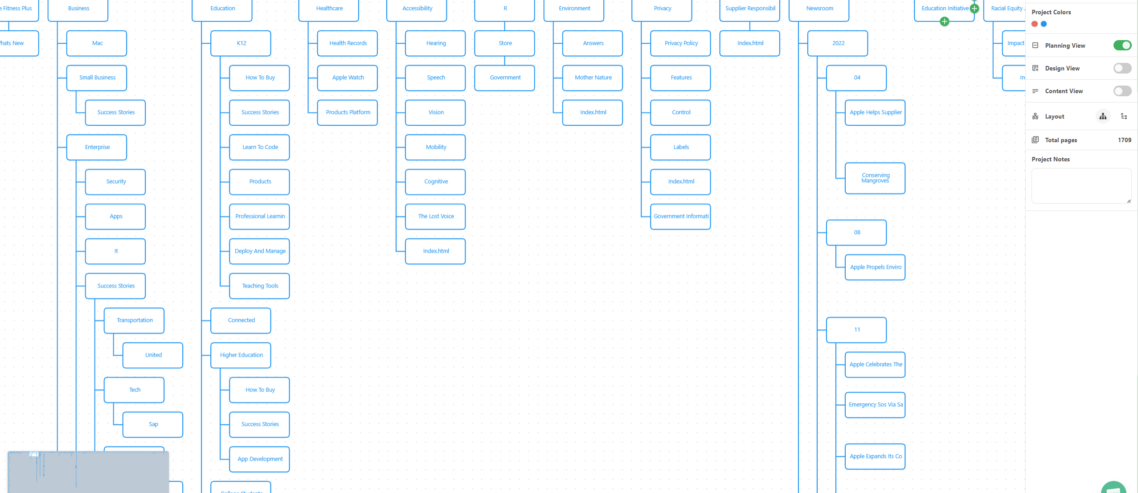
The first hurdle was discovery. Instead of clicking through every link manually, the team deployed the Site Crawler (Audit Mode). By simply entering the URL, WriteMaps crawled the entire 1,500-page domain. This instantly generated a visual map of the existing mess.
This allowed the agency to identify “dead wood,” which consists of pages that had not been updated in years. They could then visualize the scalable IA for agencies required for the new build. It turned an abstract problem into a tangible roadmap.
Phase 2: Pruning and Planning with Drag & Drop
Once the audit was live, the agency used the Visual Sitemap Builder to begin the “surgery.” Using the intuitive drag-and-drop interface, they moved legacy pages into new categories or deleted them entirely.
For pages that did not fit into the primary navigation, such as old landing pages or legal archives, they utilized Interactive Sections. This kept the primary nav clean while ensuring no vital data was lost during the website planning for agencies phase.
Phase 3: Real-Time Collaboration and “Agency Killers”
One of the biggest project bottlenecks is waiting for client feedback. To bypass the “email chain of death,” the agency used Real-time Collaboration & Guest Editing. They sent a unique URL to the client stakeholders. Those stakeholders could then leave notes directly on the sitemap nodes.
To solve the “content gap,” they used the Live Content Gathering Tool. Instead of sending a blank Word doc, the agency had the client’s subject matter experts click into the sitemap pages to upload images and draft copy directly into the structure. This ensured that client onboarding for web design was seamless and that the content matched the architecture from day one.
Phase 4: SEO and Technical Handover
A 1,500-page migration is an SEO minefield. The agency used the SEO Management Fields to map out new Page Titles and Meta Descriptions for every single page before a single line of code was written. This ensured the UX deliverables for clients included a robust search strategy.
When it came time for the build, the transition from design to development was handled via XML & CSV Exports. The developers received a clean list of URL slugs and hierarchy data. This eliminated manual entry errors and ensured the new CMS structure perfectly matched the approved blueprint.
“WriteMaps turned a month-long audit into a three-day strategy session. It is not just a sitemap tool for web designers; it is a project management powerhouse.”
Summary of Key Features Used
| Feature | Agency Benefit |
|---|---|
| Site Crawler | Instantly maps legacy sites for rapid auditing. |
| Color Coding & Tagging | Tracked “Migration Status” for items that were migrated, deleted, or pending. |
| Professional PDF Exports | Provided high-fidelity visual sitemaps for presentations. |
| AI Sitemap Generator | Used to brainstorm new service categories for the redesign. |
Whether you are handling a 15-page brochure site or a 1,500-page legacy migration, WriteMaps is the agency website planning software designed to handle the heavy lifting. Stop drawing boxes and start building better architectures.
Ready to streamline your next audit?
Get Started, Its Free

Comments
Leave a Comment